



Open-source speaker and call-for-proposals management for events.
Callboard covers the workflow from public submission through organizer review, speaker onboarding, agenda publishing, communications, and API/integration exports. It was built for the AI Engineer “Kill My SaaS” challenge as a fast, self-hostable alternative to Sessionboard.
A callboard is the physical backstage board where cast calls, schedules, and notices are posted—the original speaker-management system.
Try the demo
Live demo: https://demo.callboardhq.com · Project site: https://callboardhq.com
- Event page: https://demo.callboardhq.com/e/frontier-ai-summit-2026
- One-click judge roles (organizer and speaker): https://demo.callboardhq.com/demo
Judging this? SUBMISSION_EVIDENCE.md maps every rubric area to the exact URLs that serve it, with one thing to try on each.
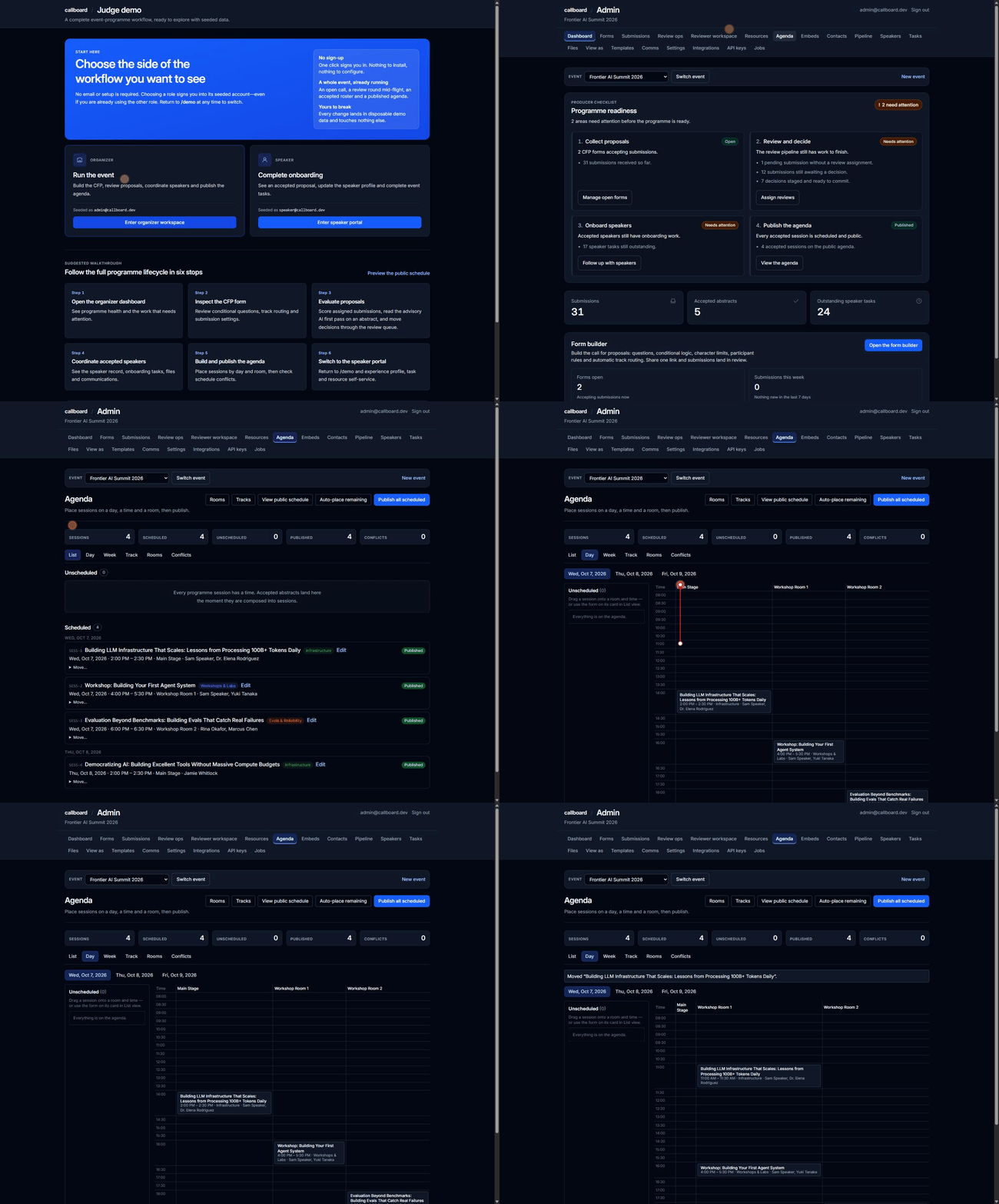
That environment is a disposable, seeded demo. It is periodically reset to the deterministic seed, so anything created there is temporary and will be wiped, and it sends no real mail. Never upload private or sensitive information to it.
A self-hosted deployment behaves differently by default: the checked-in
configuration is production-profiled and returns 404 from /demo. One-click
organizer and speaker sessions exist only on a disposable demo deployment
created from wrangler.demo.example.jsonc.
Suggested walkthrough:
- Open
/demo, choose Enter organizer workspace, and follow its six-stop judge path. - Open Forms to inspect conditional questions, shared character budgets, routing, close dates, and participant rules.
- Open Submissions to inspect the seven-state decision pipeline and commit staged accept/decline queues.
- Open Agenda and move a session on the day board; then inspect the dedicated conflict view and published schedule.
- Return to
/demo, choose Enter speaker portal, then update the profile, complete tasks, upload materials, and read event resources. - Visit Integrations, API keys, and
/developersfor exports and the Sessionboard-compatible API surface.
What is implemented
| Area | Current capability |
|---|---|
| Organizer dashboard | Producer-facing programme readiness with explicit blockers and next actions across submissions, speakers, tasks, schedule, rooms, and publication |
| CFP builder | Six-step organizer flow, reusable field registry, conditional logic, cross-field character limits, category/track routing, participant bounds, close dates, limits, and cloning |
| Public submission | Five-step mobile-first SSR flow, drafts, email-verified account entry, abstract/video modes, validation, confirmation email, and portal redirect |
| Submission decisions | Seven status views, staged accept/decline queues, bulk commit, filtering, drill-in, and manual additions |
| Review operations | Standalone assigned-only reviewer workspace, organizer “view as reviewer,” multi-round weighted scoring, reviewer aggregates and completion progress, reviewer provisioning by email with an additive capability flag, team management, round/rubric setup (add/remove criterion rows, numeric or dropdown types, lock on first submitted score), per-round blinding, reviewer conflict-of-interest recusal, reviewer reminders, and both batch assignment and direct per-reviewer assignment |
| Score reporting | Aggregate-score sorting in the submissions list, plus a reviewer score CSV export at /admin/submissions/scores.csv carrying one column per round's aggregate, one column per dropdown criterion's answer distribution, reviewer comments, and the advisory AI-triage opinion kept in its own trailing columns |
| AI first-pass triage | Advisory Workers AI triage on an abstract's detail page: a score, a queue recommendation, and a short rationale carrying the model label. It never writes a review, never changes a submission's status, and degrades to a visible "unavailable in this deployment" when no AI binding is present |
| Speaker CRM | Organization-level contact directory spanning every event, with contact profiles, notes, tags, travel notes, CSV import (preview then commit), duplicate detection and merge, add-to-event, bulk email to a filtered selection, rollups for total contacts/events/returning contacts/top companies, savable named filter segments, and a sourcing pipeline (a kanban board over five fixed stages; each card moves either by dragging or by picking a stage and submitting) with a move-audit trail |
| Files library | Organizer-side browser of every upload for an event, grouped into version chains (newest deliverable first), with per-file comments and a bulk ZIP download |
| Multi-event | Multiple events per deployment, an admin event switcher that scopes every organizer screen, and in-app event creation |
| Public & embeddable widgets | Public event page, schedule with search/day tabs/track-format-room facets and clickable speaker names, session detail, speaker directory/profiles/gallery with consent-gated headshots (monogram fallback when a speaker has not opted in), a unified “Show more” control, browser-local “My schedule” itinerary, and an .ics feed. An organizer embed builder generates four chrome-less widgets (schedule, agenda by day, speakers, speaker gallery) with theme, density, accent, and track options, emitted as an iframe snippet, a plain link, or a calendar feed. Saved embeds get a stable ?embed=<id> URL and can be enabled, disabled, or deleted |
| Resource/wiki operations | Event-scoped create/edit/order, sanitized preview, publish/unpublish, and recoverable archive-as-unpublish |
| Speaker portal | Status, deadline-gated pending corrections, accepted title/abstract/video corrections with programme-copy sync, profile, headshot/material uploads, tasks, portal forms, resources, and organizer impersonation |
| Communications | Editable templates, confirmation email, task reminders, communication log, and ICS REQUEST/UPDATE/CANCEL lifecycle |
| Agenda | List/day/week/track/room/conflict views, pointer-correct drag and drop, no-JavaScript fallback, room and speaker overlap detection, an “Auto-place remaining” action that fills unscheduled sessions into conflict-free room/time slots, room and track CRUD, organizer session editing with attributed revision history and one-click restore, publishing that holds until speakers have been informed with an explicit per-session override, and public schedule with ordered speaker/co-speaker names |
| Speaker roster | Add and edit speakers, participation status, portal-invite send, CSV import, and portal-form custom fields from organizer assignment through speaker answers |
| API | Scoped keys across six independently grantable scopes (four read, two write — none cascade), consistent envelopes, sessions/speakers/metadata endpoints, OpenAPI document, and developer page |
| Integrations | Byte-exact Accelevents CSV pair, optional API push when configured, non-blocking Airtable mirror, and built-in signed webhooks with optional Svix delivery |
| Infrastructure | One Cloudflare Worker, D1, R2, React Router framework mode, Drizzle, Tailwind, Vitest, and Playwright |
Architecture
Public CFP / organizer / speaker / API routes
                    │
        React Router framework mode
                    │
       Cloudflare Worker (one deploy)
          ┌─────────┼─────────┐
          │         │         │
        D1 DB      R2 files   Cron jobs
        Drizzle    proxied    reminders/sync
Public routes server-render by default and keep client JavaScript small. The agenda's drag-and-drop layer sits behind a client-only boundary and submits the same server-rendered form used by the accessible no-JavaScript fallback.
D1 writes use db.batch(); D1 does not support Drizzle's interactive
transactions. Uploads are proxied through the Worker so ownership checks remain
on the write and read paths. Secrets are supplied with Wrangler and never stored
in the repository.